Typical workflows
The previous page showed how CMDash's record types relate. This one follows those relationships through a day's work — getting a workspace started, running the compliance loop, and the path each of exceptions, risks, policies, vendors, audits, CMMC/SPRS and incidents take from open to closed.
Getting started
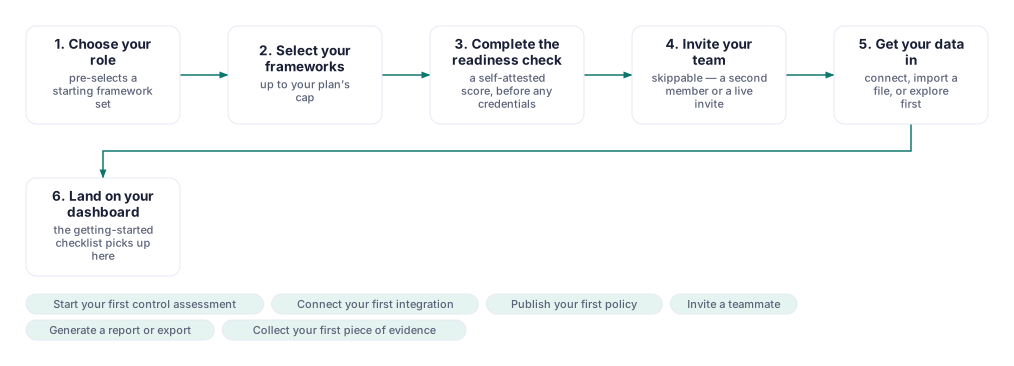
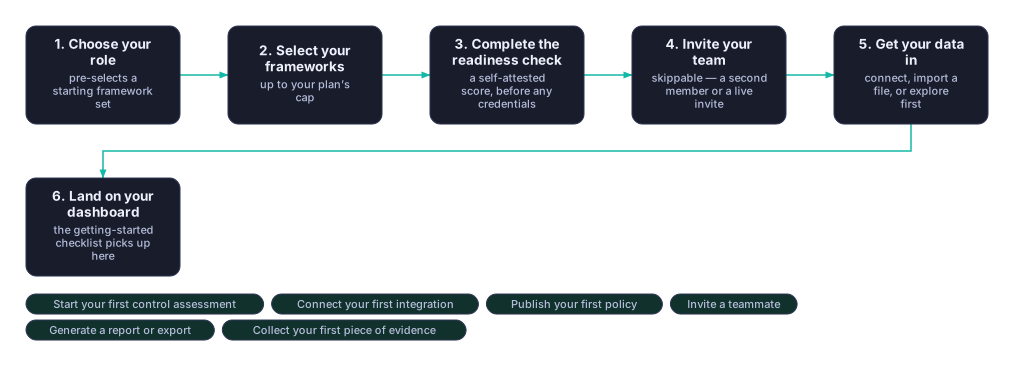
| What moves it forward | Who | Where in the app |
|---|---|---|
| Choose your role | The person setting up the workspace | The onboarding wizard |
| Select your frameworks | Same person, pre-filled from the role | The onboarding wizard |
| Complete the readiness check | Same person | The onboarding wizard |
| Invite your team (skippable) | Owner or Admin | The onboarding wizard, or Members later |
| Get your data in | Same person | The onboarding wizard, or Connections later |
The wizard runs once, after sign-up; every step but the role question can be revisited later from its own place in the sidebar. Landing on the dashboard starts a Getting Started checklist of six first milestones (a control assessment, an integration, a published policy, a teammate, a report, a piece of evidence), which disappears once every one is checked off.
The compliance loop
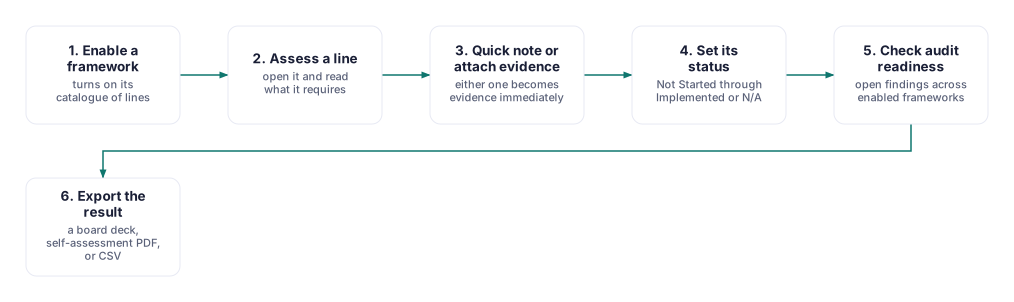
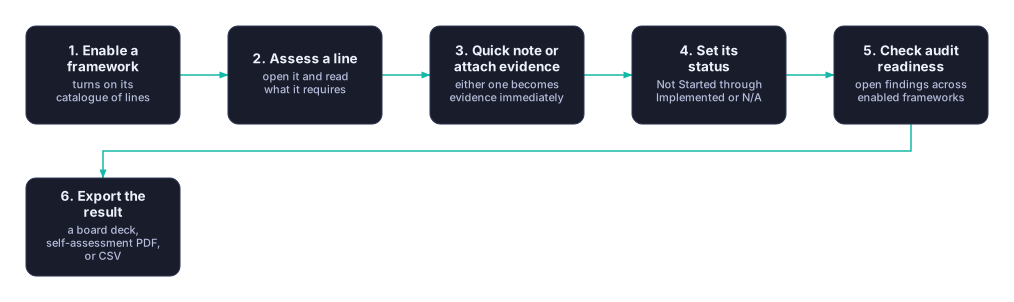
| What moves it forward | Who | Where in the app |
|---|---|---|
| Enable a framework | Owner or Admin | Frameworks |
| Assess a line | Whoever owns that control | Frameworks |
| Quick note or attach evidence | Same person | Frameworks, or Evidence |
| Set its status | Same person | Frameworks |
| Check audit readiness | GRC lead | Audit Readiness |
| Export the result | GRC lead, or whoever presents it | Exports |
This is the loop a GRC lead runs most days. A quick note typed on a line becomes evidence the moment you press Add note — there is no separate "evidence" step — and one piece of evidence can attach to more than one line or control. Audit Readiness is a periodic check across everything you've enabled, not a step in every line's own path.
Evidence lifecycle
| What moves it forward | Who | Where in the app |
|---|---|---|
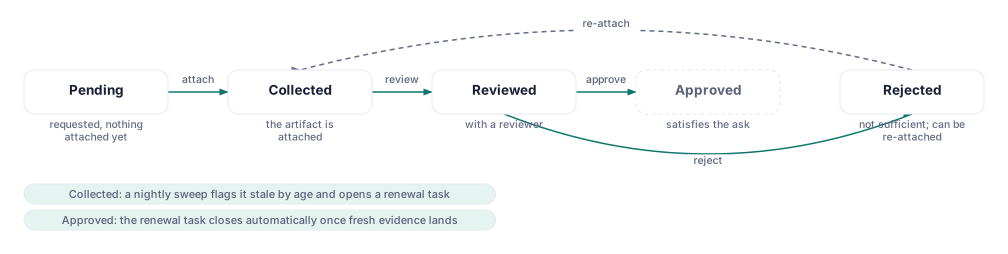
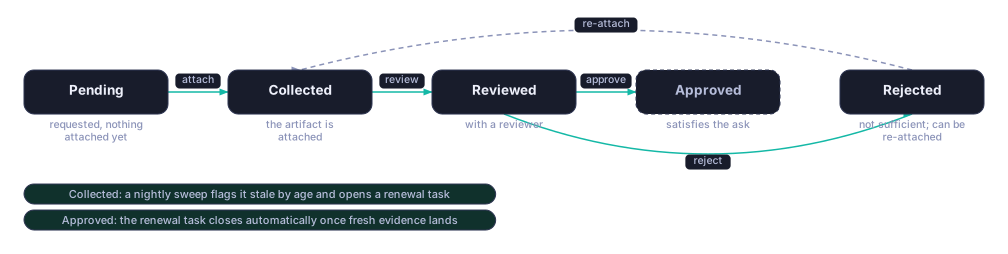
| Pending → Collected | Whoever attaches the artifact | Evidence |
| Collected → Reviewed | A reviewer | Evidence |
| Reviewed → Approved / Rejected | A reviewer | Evidence |
| Rejected → Collected | Whoever re-attaches it | Evidence |
Fresh or stale is not one of these statuses — it is worked out on every read, from the collection date and a validity window, so it can never be wrong just because a scheduled check didn't run. When a slot goes stale, CMDash opens a renewal task for its owner automatically, and that task closes itself the moment new evidence lands.
Risk lifecycle
| What moves it forward | Who | Where in the app |
|---|---|---|
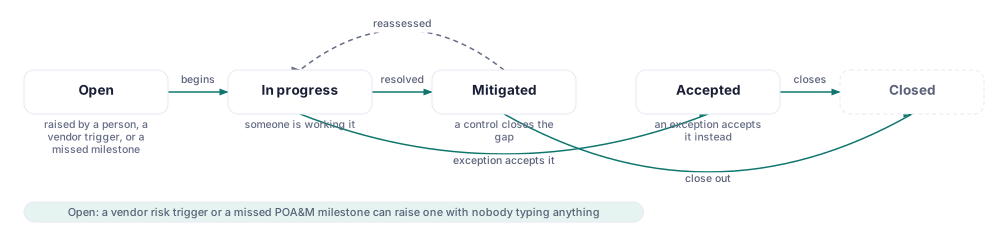
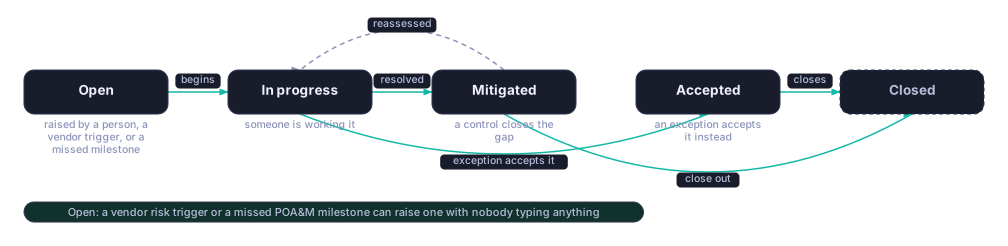
| Open → In progress | The risk owner | Risk Register |
| In progress → Mitigated | The risk owner | Risk Register |
| In progress → Accepted | An approved exception | Risk Register, via Exceptions |
| Mitigated / Accepted → Closed | The risk owner | Risk Register |
A risk can also open itself: a dropping vendor monitoring score, a rejected questionnaire, an overdue known-exploited-vulnerability match, or a missed POA&M milestone can each raise one automatically. Whichever way it opened, it's worked the same way from there.
Exception lifecycle
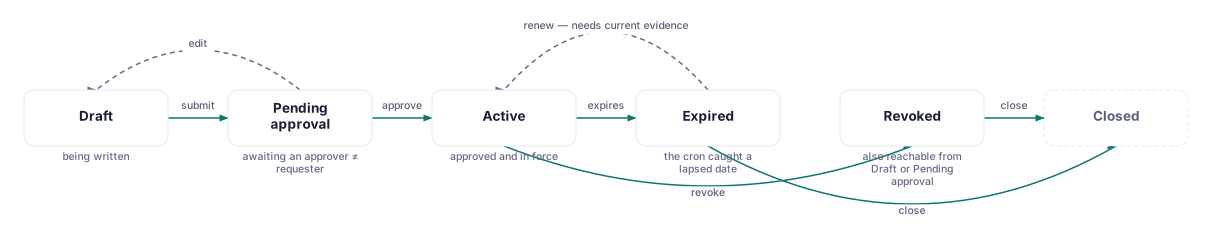
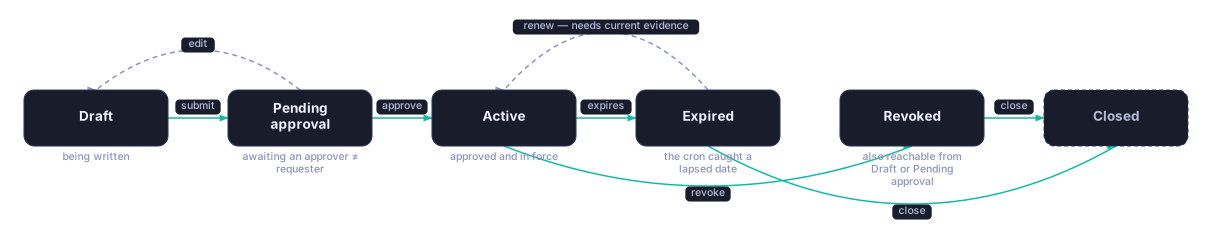
| What moves it forward | Who | Where in the app |
|---|---|---|
| Draft → Pending approval | The requester | Exceptions |
| Pending approval → Active | An approver (never the requester) | Exceptions |
| Active → Expired | Automatic, on the expiry date | Exceptions |
| Active / Pending / Draft → Revoked | Owner or Admin | Exceptions |
| Expired → Active | Whoever renews it | Exceptions |
| Active / Expired / Revoked → Closed | Owner or Admin | Exceptions |
An exception formally accepts a risk instead of remediating it, so the approver identity check matters: whoever signs off can never be the same person who asked. Renewing an expired exception is only allowed while its compensating control still has current evidence — an exception cannot quietly outlive the safeguard it depends on.
Policy lifecycle
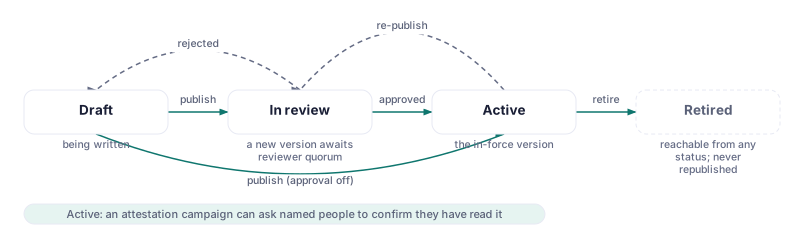
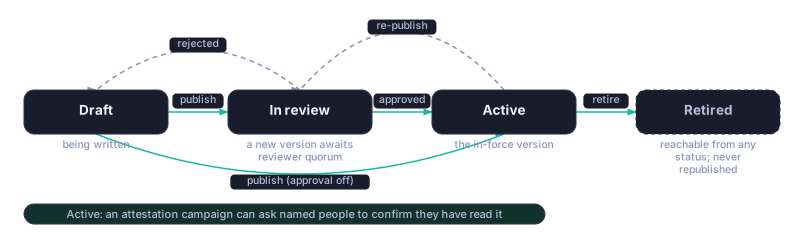
| What moves it forward | Who | Where in the app |
|---|---|---|
| Draft → In review, or straight to Active | The author, via Publish | Policies |
| In review → Active | Reviewer quorum, via Approve | Approvals |
| In review → Draft | A single Reject | Approvals |
| Active → Retired | Owner or Admin | Policies |
Whether publishing goes straight to Active or stops at In review depends on a workspace setting — approval is opt-in, not a permanent step for everyone. A single rejection is a full stop: the policy returns to Draft at once, even if other reviewers haven't decided. While a policy is Active, a separate attestation campaign can ask named people to confirm they've read it, without changing the policy's own status.
Vendor review


| What moves it forward | Who | Where in the app |
|---|---|---|
| Draft → In progress | The vendor's respondent | Vendors (TPRM) |
| In progress → Submitted | The respondent | Vendors (TPRM) |
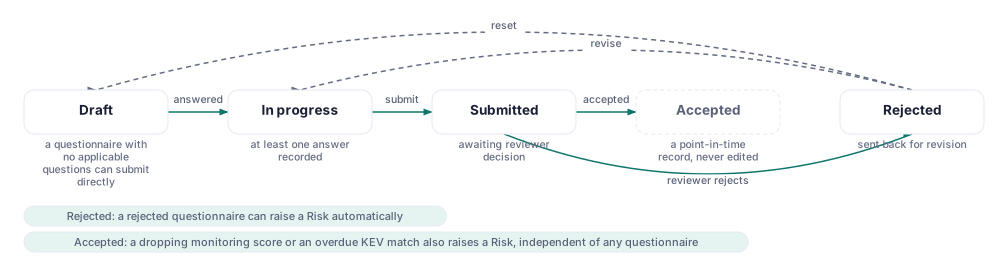
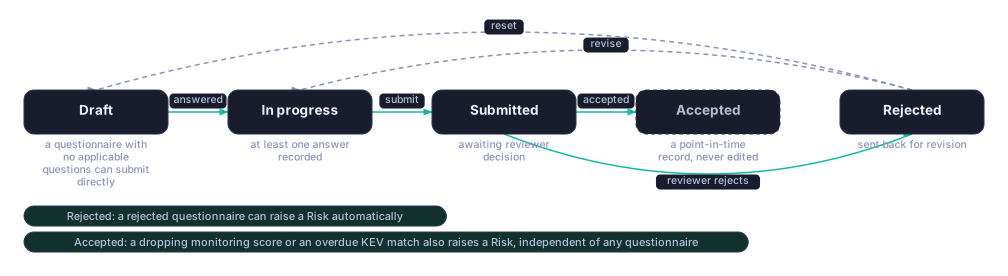
| Submitted → Accepted / Rejected | Your reviewer | Vendors (TPRM) |
| Rejected → In progress / Draft | The respondent | Vendors (TPRM) |
A questionnaire is one of two machines running for a vendor: the relationship itself moves separately, from Onboarding through Active, Under review and Offboarding to Retired. Accepted is final for a questionnaire — a re-assessment is a fresh one, never a re-opened one, the way an auditor expects a signed attestation to stay put. Independently of any questionnaire's outcome, a dropping monitoring score or an overdue known-exploited-vulnerability match can raise a risk on its own.
Audit engagement


| What moves it forward | Who | Where in the app |
|---|---|---|
| Planned → Fieldwork | The assessor | Settings → Assessors |
| Fieldwork → Reporting | The assessor | Settings → Assessors |
| Reporting → Fieldwork | The assessor, on a new finding | Settings → Assessors |
| Reporting → Complete | The assessor | Settings → Assessors |
| Planned / Fieldwork / Reporting → Cancelled | Owner or Admin | Settings → Assessors |
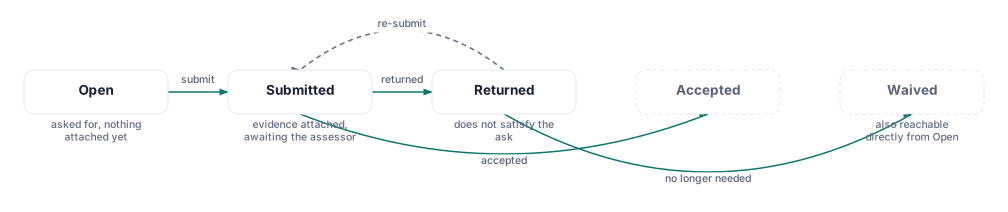
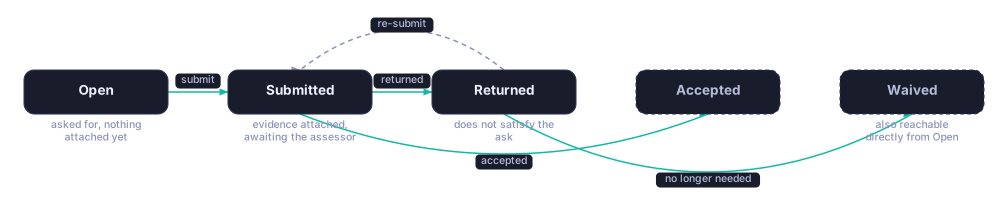
Alongside the engagement, a provided-by-client (PBC) request loop runs during fieldwork: the assessor asks for something specific, you submit evidence, and the assessor accepts it, sends it back, or waives it if it's no longer needed. A firm returning for a second year gets a new engagement under the same standing grant, not a reopened one.
CMMC and SPRS
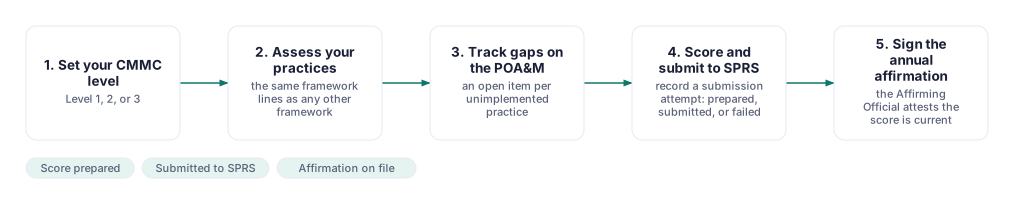
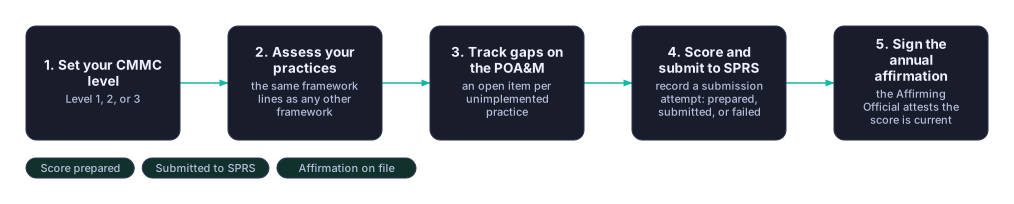


| What moves it forward | Who | Where in the app |
|---|---|---|
| Set your CMMC level | Owner or Admin | Security Program → CMMC Level |
| Assess your practices | The practice owners | Frameworks |
| Track gaps on the POA&M | The item owners | POA&M |
| Score and submit to SPRS | Owner or Admin | SPRS |
| Sign the annual affirmation | The Affirming Official | Security Program → CMMC Affirmations |
Every open practice becomes its own POA&M item, and closing one requires real closure evidence — self-reporting "done" moves an item to Pending verification, not to Completed, since an assessor treats the two differently. A SPRS submission attempt is recorded as Prepared, then Submitted or Failed, and CMDash flags any historical score computed under an earlier weight table so it can be recomputed.
Incident response
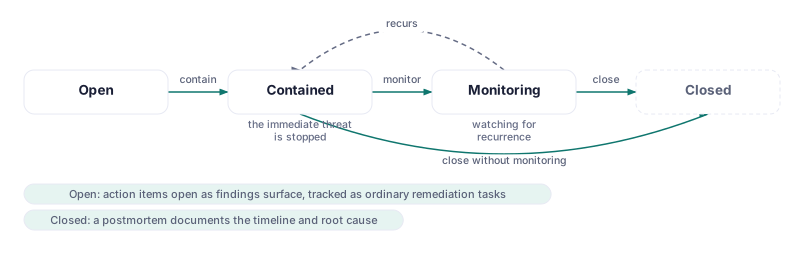
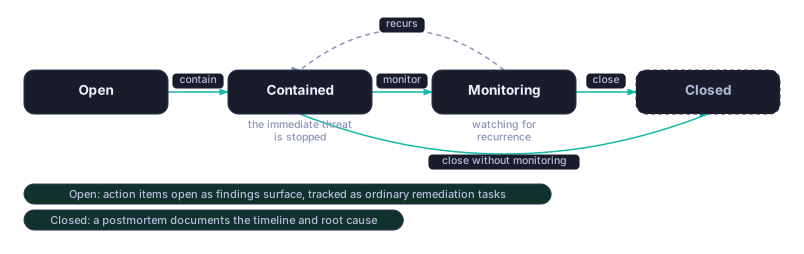
| What moves it forward | Who | Where in the app |
|---|---|---|
| Open → Contained | The responder | Incidents |
| Contained → Monitoring | The responder | Incidents |
| Monitoring → Contained | Automatic, if it recurs | Incidents |
| Monitoring / Contained → Closed | The responder | Incidents |
Action items — ordinary remediation tasks pointed at the incident — open as findings surface, and are tracked the way any other remediation task is, with the same due dates and the same one list of what's overdue. A postmortem documenting the timeline and root cause is written once the incident is closed, and stands as an evidence artifact in its own right.
Who does what
| CISO | GRC lead | MSP / vCISO | Defense contractor | Assessor | |
|---|---|---|---|---|---|
| Getting started | Sets it up | Sets it up | Sets it up per client | Sets it up | — |
| The compliance loop | Reviews the score | Runs it daily | Runs it per client | Runs it | Reads it |
| Evidence lifecycle | — | Reviews it | Reviews it per client | Reviews it | Samples it |
| Risk lifecycle | Owns the register | Works individual risks | Works it per client | Works it | — |
| Exception lifecycle | Approves | Requests | Requests or approves | Requests | Reads it |
| Policy lifecycle | Approves | Authors | Authors per client | Authors | Reads it |
| Vendor review | Reviews rollups | Runs questionnaires | Runs it per client | Runs it | — |
| Audit engagement | Sponsors it | Coordinates it | Coordinates per client | Coordinates it | Runs it |
| CMMC and SPRS | — | Assesses practices | Coordinates per client | Owns it end to end | Assesses against it |
| Incident response | Owns the response | Supports it | Owns it per client | Owns it | — |
Related
- How CMDash Fits Together — the record types and hubs these workflows move between
- Exceptions
- Vendors (TPRM) & Questionnaires
- Audit Programme
- CMMC, POA&M & SPRS
- Incidents & Exercises
- Policies & Attestations
- Evidence Collection
- Risk Register