Policies & Attestations
The Policy Management module supports the full lifecycle of organizational security policies — from creation and approval through active enforcement, attestation, and eventual archival. It feeds directly into the Policy Compliance % posture signal.
Creating a Policy
Navigate to Policies and click New Policy. Fill in:
- Title — the policy name (e.g., "Acceptable Use Policy," "Password Management Standard")
- Content — the policy body, written in CMDash's rich text editor. Supports headings, lists, tables, inline code, and hyperlinks.
- Version — the version number (e.g., 1.0). CMDash increments this automatically on each published update.
- Owner — the policy owner responsible for keeping it current and managing attestations
- Tags — optional custom tags for filtering
- Renewal Date — the date this policy expires and must be reviewed; drives automated reminders
- Linked Controls — compliance controls this policy addresses; links the policy as evidence to those controls
Click Save as Draft to save without moving to the review or approval stage.
Policy Lifecycle
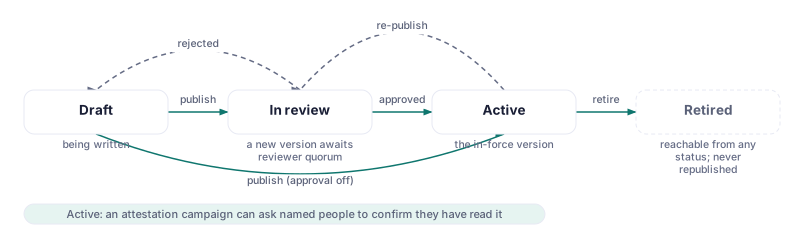
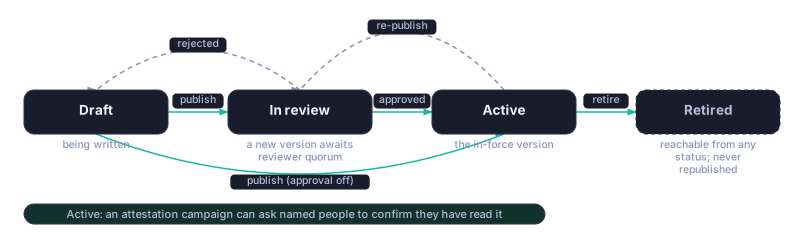
Policies move through the following status states:
| Status | Description |
|---|---|
| Draft | Policy is being written; not yet submitted for review |
| In review | A new version has been published and is awaiting the reviewer quorum |
| Active | Policy is approved, published, and in force |
| Retired | Policy is no longer applicable; reachable from any status and never republished |
Transitions between statuses are controlled by the approval workflow configured for the policy. Attempting to move a policy to Active without completing all required approvals is blocked.
Policy Approval Workflows
Approval workflows define who must approve a policy before it can be published. Workflows support multi-step approval chains.
To configure a workflow for a policy:
- Open the policy in Draft or Review status.
- Click Configure Approval Workflow.
- Add approval steps. Each step specifies one or more approvers (workspace members). A step can require all approvers or just one.
- Set step order (sequential or parallel).
- Click Submit for Review. Approvers in the first step receive a notification.
Approvers review the policy content and either approve or request changes with a comment. When all steps are complete and approved, the policy owner can click Publish to set the status to Active.
Attestation Workflows
An attestation requires designated individuals to acknowledge that they have read and understand a policy. Attestations are distinct from approvals: approvals gatekeep publishing; attestations confirm staff awareness after publishing.
To launch an attestation:
- Open an Active policy and click Request Attestation.
- Select the attestors — individual users or groups. For broad policies (e.g., Acceptable Use), this may be all users in the workspace.
- Set the attestation deadline.
- Click Send. Each attestor receives an email and in-app notification with a link to review and sign the policy.
Attestors click the link, read the policy in CMDash's interface, and click I Attest. Their name, timestamp, and IP address are recorded.
The policy record shows attestation progress: total attestors, completed, and pending. Policy owners can send reminder notifications to pending attestors from this view.
Renewal Tracking
Each policy has a Renewal Date. When a policy's Renewal Date approaches, CMDash:
- Sends a reminder notification to the policy owner at 60 days, 30 days, and 7 days before expiration
- Displays the policy in the Compliance Calendar view under upcoming deadlines
- Flags the policy with a "Renewal Due" badge in the Policy list view
When a policy expires without being renewed, its contribution to the Policy Compliance % signal degrades, which affects the Posture Score. Renewing a policy means creating a new version (the content editor opens with the existing content pre-filled), running it through the approval workflow, and publishing it. The old version is automatically archived.