Exceptions
What it is
Exceptions are formal risk-acceptance records: an approver, compensating controls, and an expiry date, so accepted risk is tracked instead of invisible. An exception can target a Control, a Risk, or a Maturity Dimension — whichever one you're formally choosing not to fix right now. Once approved, an active exception suppresses the score impact of the thing it targets (a control's compliance score, or a maturity dimension's contribution) for as long as it stays active and unexpired, and CMDash schedules two calendar reminders automatically: an expiry deadline and a re-review milestone. An Exception Aging heatmap on the same page plots every active or expired exception on two axes — how soon it expires, and how overdue its next re-review is — so the ones that need attention are visually obvious rather than buried in a list.
When to use it
Use an exception whenever your organization is knowingly choosing to accept a risk, a compliance gap on a specific control, or a maturity shortfall rather than remediate it right now — and you need that decision to be visible, time-bound, and re-reviewed, rather than a gap that just sits there unexplained. It is the mechanism an assessor expects to see cited when a control isn't met but the finding isn't news to you.
Before you start
- Tier: No tier gate — the Exceptions module itself is available on every tier.
- Role: Any authenticated tenant member can create, edit, and submit an exception for approval. Approving, revoking, closing, and marking an exception reviewed are OWNER/ADMIN only — and the approver cannot be the same person who requested it; the app disables the Approve button and shows "You cannot approve your own request" if you try.
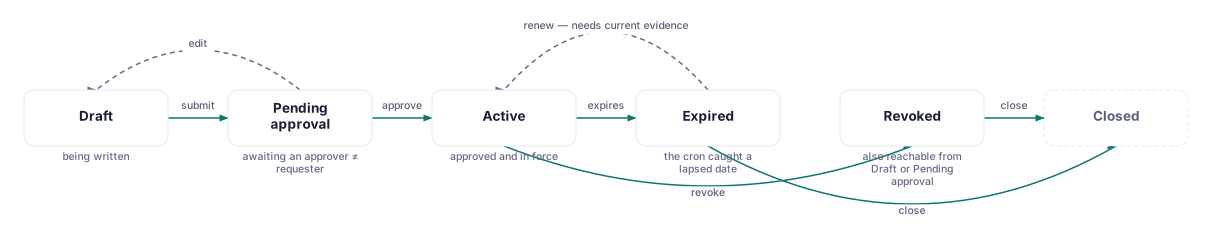
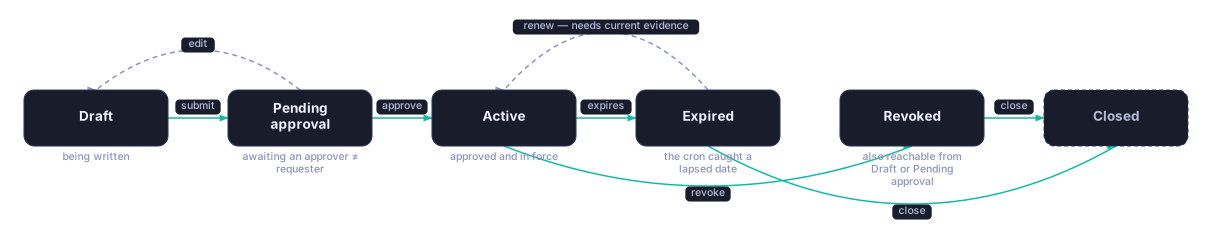
- Renewal exists in the API only, not in the app today: the backend can extend an
already-active exception's expiry date against current compensating-control evidence
(
POST /exceptions/:id/renew, gated on theEXCEPTION_RENEWALfeature, Command and above), but no page in the app calls it — see "Limits" below.
How to
Request an exception
- Go to Security → Exceptions and click the create action.
- Choose a target type: Control (enter a framework slug and control ID, e.g.,
cmmc-l2/AC.L2-3.1.1), Risk (pick one from your risk register), or Maturity Dimension (its ID). - Enter Compensating controls as free text — what you're doing instead of the thing this exception accepts not doing.
- Set an Expires date. This is what drives both the expiry reminder and the Exception Aging heatmap's most urgent column.
- Save it as a draft, then click Submit on the row to move it into Pending Approval.
Approve, revoke, or close an exception
- On a Pending Approval row, an OWNER or ADMIN (not the requester) clicks Approve. Approving moves it to Active, suppresses the target's score impact, and schedules the expiry deadline and re-review milestone on your compliance calendar automatically.
- On an Active exception, an OWNER/ADMIN can click Mark reviewed to reset the re-review clock — this is what keeps a healthy exception out of the "overdue" rows on the aging heatmap.
- Revoke an exception (Draft, Pending Approval, or Active) when it should stop applying immediately — CMDash confirms first: "The exception immediately stops applying, and the linked control or risk reverts to its normal status."
- Close an Active, Expired, or Revoked exception when it's done — the record stays in history but no longer applies. CMDash confirms: "The record stays in history but no longer applies."
Read the Exception Aging heatmap
- The heatmap sits directly under the page header. Rows are how overdue the next re-review is (On track / Due soon / Overdue / Severely overdue); columns are how soon the exception expires (Expired / ≤7d / 8-30d / 31-90d / 90+d).
- Color rises toward red as both dimensions get worse at once — an exception that's both overdue for review and about to expire is the most urgent cell on the grid. A count of zero in a cell renders pale and unlabeled rather than a false-looking "0."
- Only Active and Expired exceptions are plotted — Draft, Pending Approval, Revoked, and Closed records don't need aging attention and are excluded.
Common questions
How does an exception relate to the risk it's accepting? When the target type is Risk, the exception is a separate, formal acceptance record layered on top of that risk — it is not the same mechanism as setting a risk's own status to "Accepted" in the Risk Register (see Risk Register). The two can describe the same real-world decision, but CMDash does not automatically keep them in sync: approving an exception on a risk does not, by itself, change that risk's status field, and vice versa. Pick one mechanism per risk and be consistent, or use both deliberately — an Exception for the calendar/heatmap tracking, the Risk's own status for its lifecycle in the register.
Does an exception show up on my POA&M export? Not automatically. POA&M items have their own
independent RISK_ACCEPTED terminal status for the same concept, but there is no data link
between an Exception row and a PoamItem row — closing or approving one does not create,
close, or update the other. If an assessor needs the acceptance reflected on your POA&M
specifically, record it there as well.
What happens to the target's score while an exception is active? It's suppressed — the compensating-controls narrative and the exception's own record explain why the score doesn't reflect the underlying gap, rather than the gap silently disappearing from view. Once the exception expires (and isn't renewed or re-reviewed), the suppression ends and the score reflects the gap again.
Limits: there is no bulk-approve action — each exception is decided individually. Renewal (extending an active exception's expiry against current compensating-control evidence) exists as an API endpoint but has no button anywhere in the product; today, renewing means letting the exception expire and creating a fresh one.