Overview
CMDash is a GRC and security operations platform purpose-built for CISOs and security professionals. It consolidates posture scoring, compliance tracking, risk management, policy governance, and board reporting into a single, continuously updated workspace. Rather than pulling data manually from disparate tools, CMDash ingests signals from your existing security stack via integrations and surfaces them as actionable intelligence.
How the Modules Connect
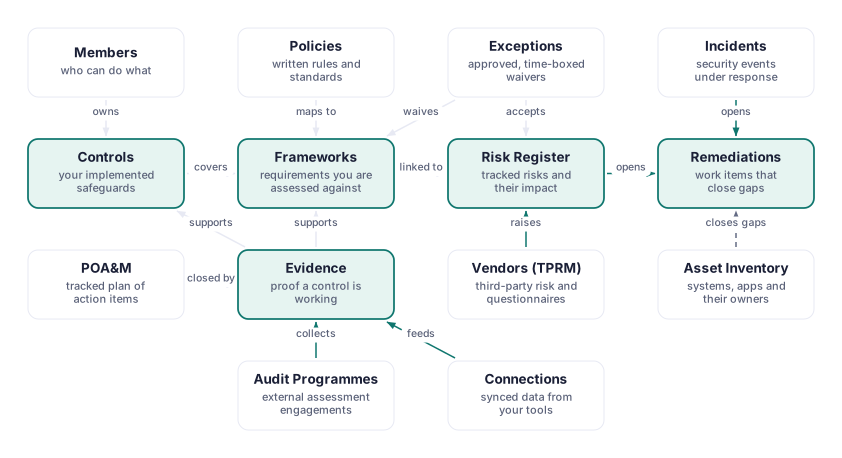
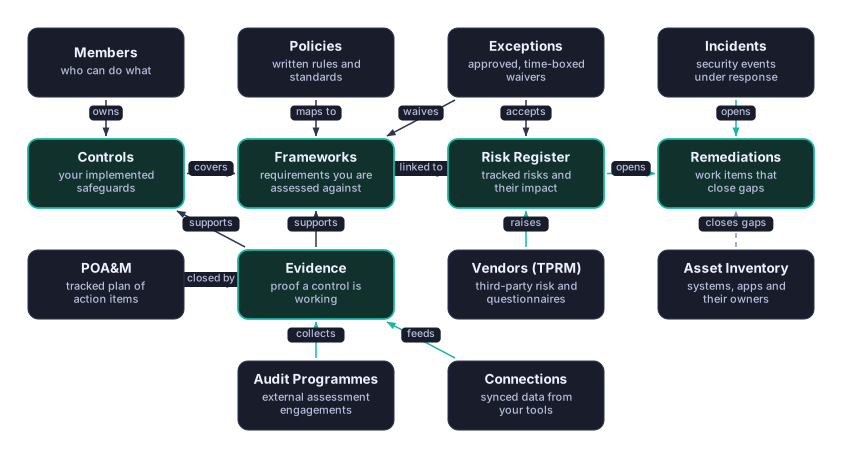
Tenant and Org Management scopes every request behind Auth & Identity, then feeds the Posture, Compliance, and Integration engines that the rest of CMDash builds on. For the full picture of how frameworks, controls, evidence, risks, and remediation tasks link to each other, see How CMDash Fits Together.
Who CMDash Is For
- CISOs and security directors who need a real-time view of organizational posture and a defensible narrative for the board
- GRC managers and analysts who manage compliance programs across multiple frameworks and coordinate audit evidence
- Security engineers who own remediations and need clear task assignments with due dates and status tracking
- vCISOs and MSPs who manage multiple client environments from a single control plane
[Command+]
The Daily Workflow
CMDash is designed around a daily operational rhythm:
- Check the Dashboard — open the day with your live Posture Score and overnight alerts. The AI Narrative
[Command+]has already summarized the top three exposure areas and recommended actions. - Review the Narrative — read the daily LLM summary, note any new anomalies or compliance drift flagged overnight.
- Action Top Risks — move into the Risk Register, update risk statuses, create or assign remediation tasks for anything that escalated.
- Update Compliance — verify control statuses, link new evidence from recent integration syncs, and check the Compliance Calendar for upcoming deadlines.
- Export for the Board — when it is reporting time, generate a Board Snapshot PDF or Board Deck .pptx directly from the Reports section with one click.
Tier Overview
Features throughout this guide are marked with tier badges when they are restricted to specific subscription levels:
| Badge | Tier |
|---|---|
| (no badge) | Available on every paid tier, from Starter up |
[Essentials+] | Essentials and above |
[Command+] | Command and above |
[Enterprise] | Enterprise only |
The five tiers are Free, Starter, Essentials, Command, and Enterprise. Free is a no-cost plan for one job: a CMMC self-assessment on one framework, with POA&M tracking, for two users. It does not include everything marked (no badge) above. Where a page or feature is not on your plan, CMDash shows which plan includes it, and nothing you created is deleted. New self-serve workspaces start directly on Free, with no card. Starting a 30-day trial of Starter, Essentials or Command is a separate step, through the same Stripe Checkout the plan is bought with; it collects a card up front and converts to that plan and price on day 30 unless you cancel first, which drops the workspace back to Free. For a full tier comparison, contact support@cmdash.com or visit the pricing page.