CMMC, POA&M, SPRS & OSCAL
What it is
This guide covers the DoD-contractor-facing assessment and reporting workflow that sits on top of CMMC control tracking: choosing a CMMC target level, scoring it for SPRS, tracking open gaps as a Plan of Action & Milestones (POA&M), exporting standards-based OSCAL documents, and generating the official CMMC self-assessment package. (For how CMMC control tracking itself works — enabling a level, mapping evidence — see CMMC Tracking.)
- CMMC Level (
/program/cmmc-level) — pick which of the three CMMC 2.0 levels (Foundational / Advanced / Expert) your program targets. It is a tab on Security Program, not its own sidebar row: Security → All Security tools → Security Program → CMMC Level. - SPRS (
/sprs) — the Supplier Performance Risk System Basic Assessment score, computed from your NIST SP 800-171 Rev 2 practice assessments. Compliance → All Compliance tools → SPRS. - POA&M (
/poam, Security → POA&M) — tracked weaknesses with an owner, a committed date, and the evidence that closed them. - OSCAL (
/oscal) — import, validate, diff, and export NIST OSCAL documents (system security plans, component definitions, assessment results) built from your framework assessments. Compliance → All Compliance tools → OSCAL. - Official CMMC self-assessment export — a government-ready PDF, generated from Reports →
Exports (
/exports), not from any of the pages above. - System Boundary (
/program/system-boundary) — the CUI authorization boundary a CMMC assessment is scoped to; covered in Security Programme.
When to use it
Use CMMC Level as soon as a DoD contract or solicitation names a CMMC requirement, to decide which practice set (17, 110, or 110+enhanced) applies to you. Use SPRS whenever you need the numeric score DoD's Supplier Performance Risk System expects — the same score that feeds the official self-assessment package. Use POA&M to track and close the gaps SPRS finds, with the 180-day close-out rule Level 2 requires for the practices it allows to be POA&M'd at all. Use OSCAL when you or an assessor needs a machine-readable SSP, component definition, or assessment results document instead of a narrative PDF. Generate the official self-assessment PDF when a government reviewer or C3PAO (assessor) needs the formal package: cover page, senior-official affirmation and signature block, per-family results, and a POA&M summary.
Before you start
CMMC Level, SPRS, and STIGs are ungated by tier. Only the C3PAO audit-package build needs a plan feature (POA&M export, Starter and above). Everything else needs the compliance permission (part of the custom-role permission matrix, which most roles have by default) and the role noted per action below. Your plan caps how many frameworks you can track at once (see CMMC Tracking).
SPRS scoring is CMMC Level 2 only — whatever target level you pick. This is the one place where choosing a level does not change what the rest of the product does for you, so it is worth knowing before you plan around it. The SPRS score is always calculated against the CMMC Level 2 practice set; it never reads your chosen target level. The official self-assessment package and the C3PAO audit package are different — they accept Level 2 or Level 3, but not Level 1.
| If you target… | SPRS Basic Assessment score | Official self-assessment PDF | C3PAO audit package |
|---|---|---|---|
| Level 1 (Foundational) | No — see below | No | No |
| Level 2 (Advanced) | Yes | Yes | Yes |
| Level 3 (Expert) | No — Level 3 has no SPRS score | Yes | Yes, but with no SPRS CSV inside it |
Everything else in this guide is level-agnostic: CMMC tracking, the POA&M register and its exports, OSCAL, and the generic compliance-report and POA&M exports all work for Level 1, 2 and 3 alike.
What this means in practice:
- If you target Level 1, the SPRS page still renders, but the number on it is scored from your Level 2 practice assessments — not your 17 Level 1 practices. Treat the page as "not applicable to my target level" rather than as a Level 1 result. The scale it implements is DoD's Basic Assessment methodology, which is defined over the 110 NIST SP 800-171 requirements the Level 2 practice set mirrors; CMDash does not attempt to map it onto the Level 1 or Level 3 practice sets.
- If you target Level 3, SPRS is unavailable rather than explicitly refused: the audit package
omits the SPRS CSV and the
self-assessment report carries no score, so a Level 3 package contains the POA&M and SSP content
without a score and without an in-artifact explanation of why. Recorded SPRS submissions and
per-practice weight overrides are likewise stored against
cmmc-l2only.
If an SPRS Basic Assessment score is something you need, track CMMC Level 2: that is the framework SPRS reads, whatever else you have scoped. What a given contract or level actually requires you to file is a question for your contracting officer, not for this page.
The POA&M register is on every plan; POA&M and OSCAL exports start at Starter.
POA&M tracking is included in every plan. The
POA&M CSV and XLSX, every OSCAL document and the C3PAO audit package need POA&M export, included
from Starter up; a workspace without it is refused on them. OSCAL's Validate and Diff sub-pages work for any role that can reach /oscal at
all, regardless of tier — only the export endpoints are feature-gated, per the page's own banner:
"Exporting OSCAL documents requires the Owner or Admin role. Validate and Diff work for any role
that can reach this page."
Roles: setting the CMMC target level, recording an SPRS submission, editing SPRS weight overrides, creating/updating/deleting POA&M items, and exporting OSCAL documents all require Owner or Admin; recording an SPRS submission attempt and editing per-practice SPRS weight overrides are further restricted to Owner only. Generating the official self-assessment PDF is Owner or Admin. Reading CMMC level data, SPRS scores, and the POA&M register is open to any role once the plan allows it.
How to
-
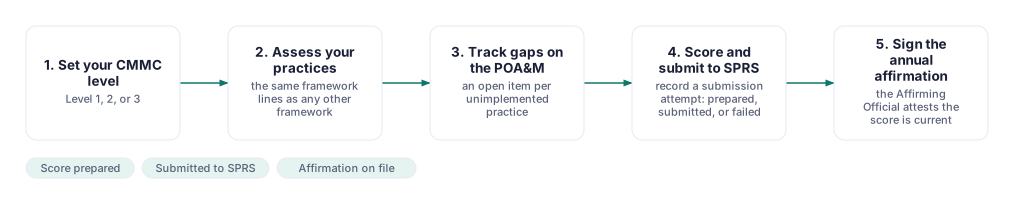
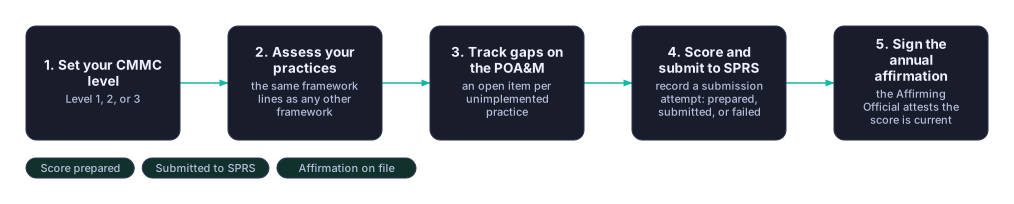
Pick your CMMC target level. Go to Security → All Security tools → Security Program, then open the CMMC Level tab. An Owner or Admin sees "Choose one below"; any other role sees "Ask an OWNER or ADMIN to choose one below." Choosing Level 1, 2, or 3 sets
isCurrentTargetfor that level and determines which framework's tracking view the rest of this guide uses. It does not redirect SPRS scoring, which always reads the Level 2 practice set, and the self-assessment and audit packages accept Level 2 or Level 3 only — see the table under "Before you start". In the demo workspace, Level 2 is targeted, with 53 of 110 practices implemented (a 60% progress score) and 36 gaps live viaGET /api/cmmc/levels. -
Check your SPRS score. Go to Compliance → All Compliance tools → SPRS ("SPRS Basic Assessment"). It always scores your CMMC Level 2 practices, whatever level you targeted in step 1. The page shows your numeric score out of the maximum, a breakdown of Implemented / Planned / Not Implemented / N/A practices, and deductions grouped by weight (1, 3, or 5 points per gap). Use Gaps only / All practices to filter the per-practice table below it. Click Export CSV or Export PDF to download the assessment in either format.
The weights come from Annex A of the DoD NIST SP 800-171 Assessment Methodology v1.2.1: 42 requirements cost 5 points, 14 cost 3 and 51 cost 1, so the deductions total 313 and the lowest possible score is −203. Two requirements — 3.5.3 (multifactor authentication) and 3.13.11 (FIPS-validated cryptography) — cost 3 instead of 5 when marked In Progress.
One requirement is not scored at all: 3.12.4, the system security plan. Annex A assigns it no point value, because the SSP is what defines the assessment's scope. If 3.12.4 is not implemented, the page and both exports say "Assessment could not be completed" instead of showing a score — there is no number to file with SPRS until you have a system security plan.
-
Track a gap as a POA&M item. From Compliance → All Compliance tools → SPRS (or a control's gap directly), go to Security → POA&M ("Plan of Action & Milestones") and click Add from a control gap (Owner/Admin only) to pull a gap in, or track weaknesses found any other way. Filter by status, severity, or SLA; overdue items are shown in red.
-
Validate or diff an OSCAL document. On Compliance → All Compliance tools → OSCAL, click Validate a document or Diff two documents — both work regardless of role or plan once you can reach the page.
-
Export an OSCAL document (Starter+, Owner/Admin). From the same OSCAL page, pick a framework from the table (built from Compliance → Frameworks, so add a framework there first if none appear) to reach its per-framework export options for a system security plan, component definition, or assessment results document.
-
Generate the official CMMC self-assessment PDF. This lives under Reports → Exports (
/exports), in the "CMMC Self-Assessment" section — described on the page itself as "An official NIST SP 800-171 / CMMC Level 2 Basic (self) assessment report for a government reviewer or third-party assessor (C3PAO) — with a cover page, senior-official affirmation and signature block, per-family results, and a POA&M summary." Choose Assessment Level (CMMC Level 2 or Level 3), then optionally fill in CAGE Code, Senior Official Name, Senior Official Title, In-Scope System(s), Point of Contact, Mailing Address, and Assessment Scope / Authorization Boundary — "All fields below are optional; anything left blank prints as 'to be completed.'" Click Generate Self-Assessment PDF. The finished document appears in the page's Export History as "CMMC Self-Assessment (PDF)."
Common questions
Do I need a paid plan to track CMMC at all? No — CMMC tracking, SPRS scoring and the POA&M register are open on every plan. The POA&M/OSCAL exports and the C3PAO audit package start at Starter; Evidence Packages are Enterprise.
Where is my System Security Plan, and why does it say "NOT READY FOR SUBMISSION"? Under
Security Program → System Security Plan (/program/ssp), on every plan, for CMMC Level 2: read
it or download it as Markdown or a print-ready page (save as PDF). The banner names what
CMDash cannot write: the System Description and Authorization Boundary narratives, and any
security role (System Owner, Authorizing Official, ISSM/ISSO, CMMC POC) with no holder. Owner/Admin
write the narratives on that page; each save is a stored, numbered version. The banner clears when
both are written and every role is held. The audit package and OSCAL export stay Starter and above
and use your stored narratives; a Level 3 SSP is not editable on the page yet.
What are assessment objectives? NIST SP 800-171A (June 2018) splits the 110 Level 2 requirements into 320 determination statements. On a practice, set each to Met, Not met or Not applicable. Once you record any, the practice counts as Implemented in the SPRS score, the SSP and the signed self-assessment only while every applicable objective is Met; otherwise In Progress or Not Started. Claimed answers are never scored.
Can any Owner/Admin submit our SPRS score? Recording a submission attempt and editing weight overrides are Owner only.
Can Level 1 practices go on a POA&M? No — every Level 1 practice must be fully in place before submission. Level 2 allows a POA&M only for lower-weight practices, with a 180-day close-out.
Related
- In-app: Security → All Security tools → Security Program → CMMC Level tab
(
/program/cmmc-level), Compliance → All Compliance tools → SPRS (/sprs), Security → POA&M (/poam), Compliance → All Compliance tools → OSCAL (/oscal), Reports → Exports (/exports) - CMMC Tracking — enabling and mapping CMMC control tracking itself
- Security Programme — System Boundary and the rest of Program
- Evidence Collection — evidence behind CMMC practice assessments