How CMDash Fits Together
CMDash looks like a long sidebar of separate pages, but underneath it is a small number of connected record types: what you're required to do, what you've built to do it, the proof that it works, the risks you're carrying, and the work items that close the gaps. This page is the map — five diagrams, each one hop of detail deeper than the last, so you can see how a change in one place shows up somewhere else.
The map
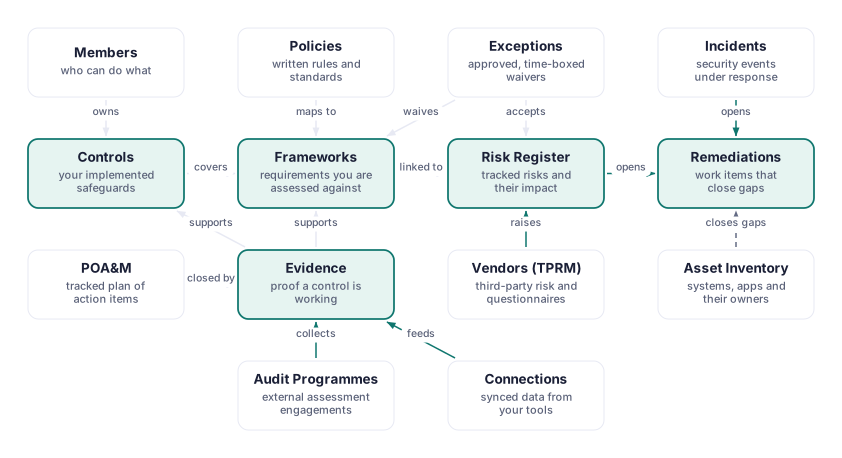
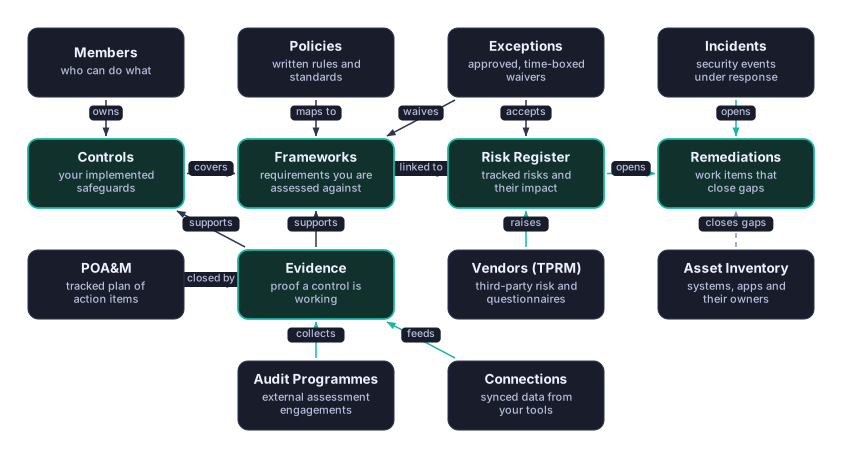
A handful of areas sit at the centre of the app because almost everything else connects to one of them: Frameworks, Controls, Evidence, Risk Register and Remediations. On the diagrams in this guide, a box with a heavier, coloured border is one of these hubs; an ordinary box is a surface that feeds into a hub or draws from it. An arrow always points from the thing that does the linking, producing or opening, toward the thing it links to, produces or opens — the short label on the arrow (covers, raises, opens, feeds) is the verb a person would use to describe the connection out loud.
Read the map loosely: Policies and Exceptions attach to Frameworks; Vendors and Exceptions also attach to Risk Register; Incidents and your Asset Inventory both open work in Remediations; and Connections, POA&M and Audit Programmes all add to your Evidence. The next four sections zoom into each of those hubs one at a time.
Framework lines, your controls and evidence
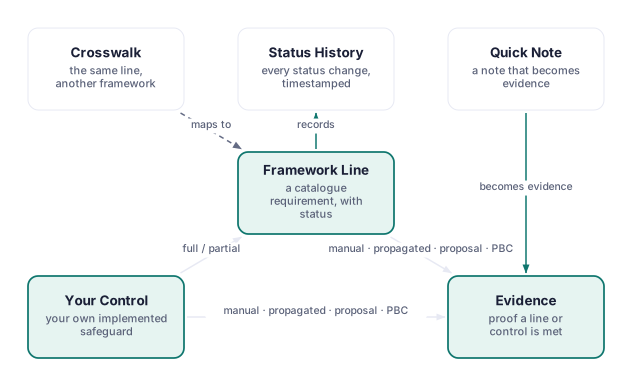
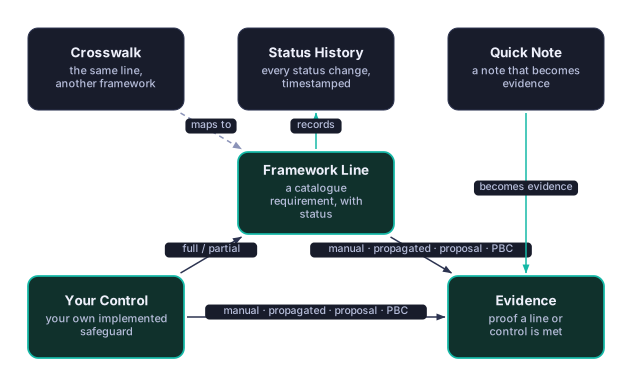
A framework line is not a control. A framework line is the catalogue requirement itself — one row under Frameworks, with its own status and its own history — while a control is something you built: a named, owned safeguard that can cover several lines across several frameworks at once. Keeping the two separate is what lets one access-review process, say, satisfy a dozen lines in three different frameworks without you maintaining a dozen copies of the same description.
Evidence is the third corner of the triangle, and it links to a framework line, to a control, or to both — the same screenshot or export can be attached everywhere it applies instead of existing once per place it's needed. The fastest way to add it is a Quick Note: type a note directly on a framework line and it becomes a dated, attributed piece of evidence on the spot — a note is evidence, not a separate field that sits beside it. Every status change a line goes through is kept in its status history, and a Crosswalk chip on a line opens the equivalent requirement in another framework you've enabled.
Risks and what surrounds them
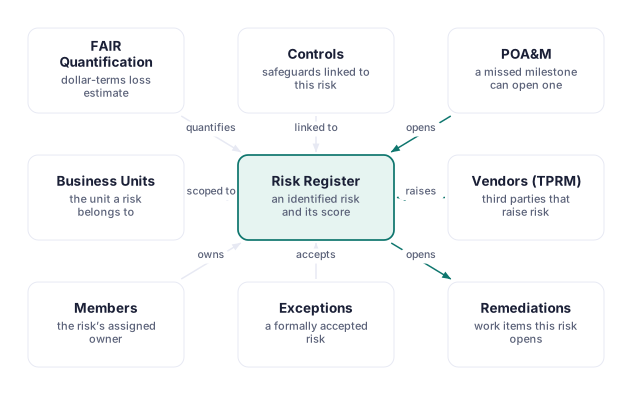
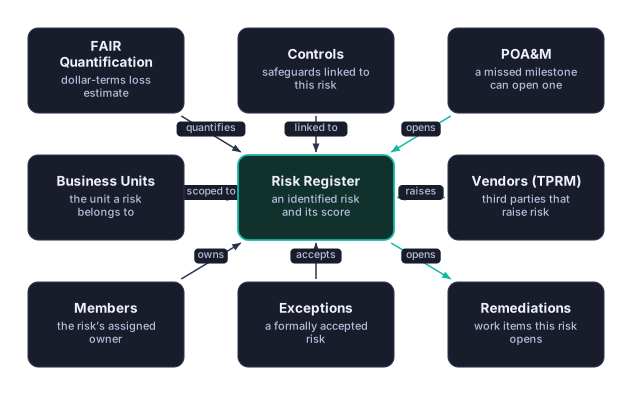
A Risk Register entry rarely exists in isolation. Controls link to a risk to show which of your safeguards bear on it; a FAIR Quantification assessment turns it into a dollar-terms loss estimate; and a Business Unit and an owner in Members are attached to it so the right person is accountable. A risk can be raised automatically by Vendors (TPRM) — a dropping monitoring score, a rejected questionnaire, or an overdue known-exploited-vulnerability match all raise one without anyone typing a description — or it can be opened by a missed POA&M milestone. Once a risk exists, it can be worked in one of two ways: Exceptions can formally accept it instead of remediating it, or it can open one or more Remediations work items, which is where the next section picks up.
Remediation tasks: one work item for everything
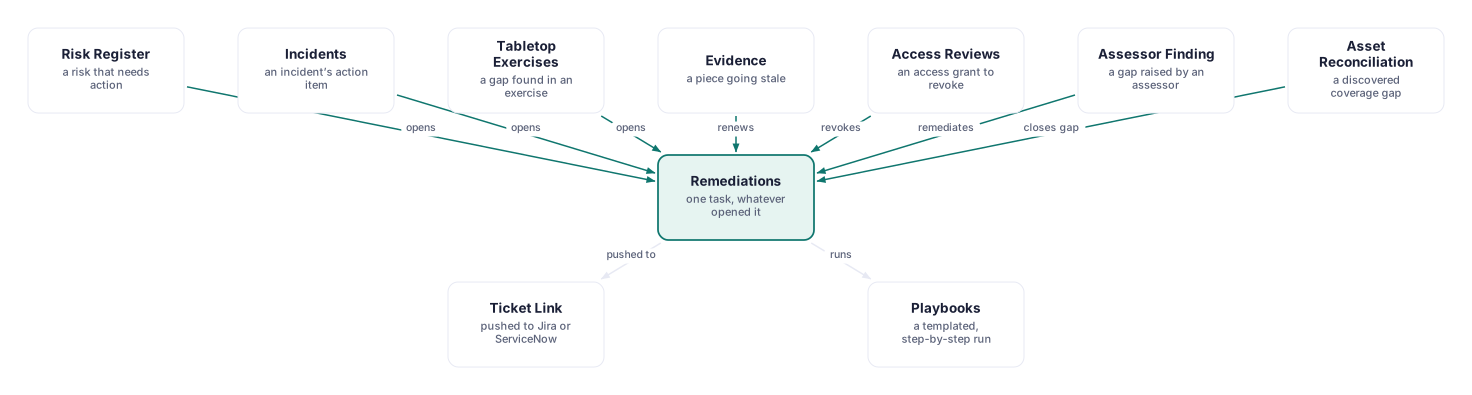
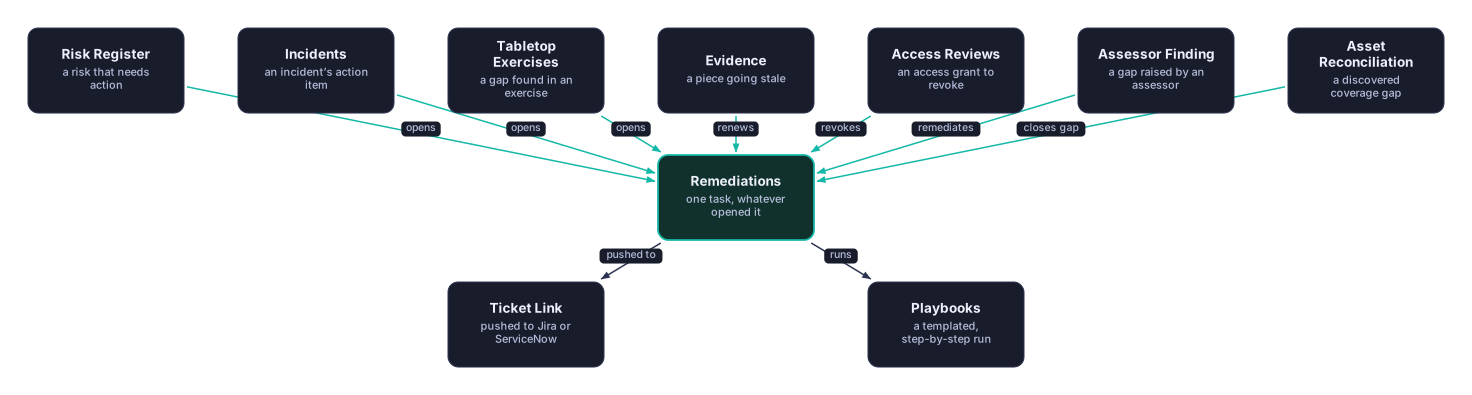
Whatever opens a piece of work in CMDash, it lands in Remediations as the same kind of record: a task with a title, an assignee, a due date and a status. A risk can open one; so can an incident, a tabletop exercise finding, a piece of evidence that's gone stale and needs renewing, a revoke decision from an access review, a gap an outside assessor raised, or a coverage gap found while reconciling your asset inventory. Because every one of those becomes an ordinary remediation task, you track them all the same way — one list, one set of statuses, one place to see what's overdue — rather than learning a different workflow for each source. From there, a task can be pushed out to an external ticket in Jira or ServiceNow, or run through a templated, step-by-step playbook.
People, roles and access
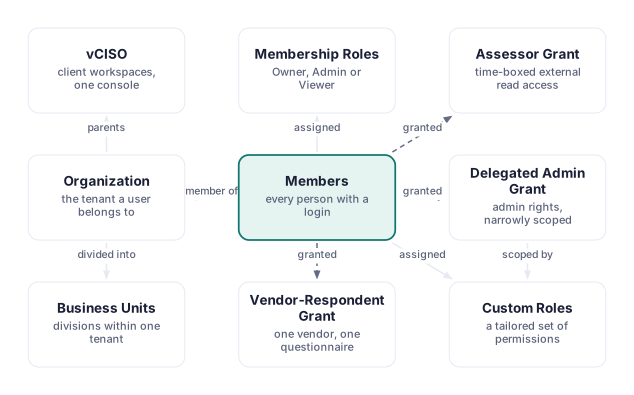
Every person who can sign in is a member of one Organization, with a built-in role of Owner, Admin or Viewer, or a tailored custom role built under Roles. Beyond ordinary membership, three narrower kinds of access exist for people who aren't a regular part of your team: an Assessor Grant gives an outside auditor time-boxed, read-only access scoped to specific frameworks; a Vendor-Respondent Grant gives a third party's contact access to exactly one questionnaire; and a Delegated Admin Grant gives someone admin-level rights over a narrow slice of the workspace, scoped by a custom role. An organization can also be divided into Business Units for larger teams, and — for an MSP or vCISO running more than one client — an organization can parent separate vCISO client workspaces, each with its own members and its own data.
Where to go next
- Compliance Frameworks — enabling frameworks, control status, and crosswalk in day-to-day use
- Evidence Collection — automated and manual evidence, packages, and the review workflow
- Risk Register — adding, scoring, filtering, and exporting risks
- Remediations — tracking remediation tasks and generating POA&M exports
- Exceptions — requesting, approving and reviewing a compensating control
- Vendors (TPRM) & Questionnaires — the vendor register and questionnaire workflow
- Users & Roles — inviting teammates and managing built-in and custom roles
- The typical workflows — the same hubs, followed step by step through a day's work