Security Programme
What it is
Program is CMDash's hub for the parts of an information security management system (ISMS) that exist independently of any one framework's controls: the charter that defines scope and authority, the objectives the program is working toward, the committees and management reviews that govern it, and the security-awareness training assigned to your people. The hub lives at Security → All Security tools → Security Program and opens on a status page — the code names it the "ISPM hub" — that shows each governance artifact's health (On track, Needs attention, Critical, or Not set up) alongside a second row of read-only counts pulled from other modules (Risks, Policies, Exceptions, KPI/KRI, Initiatives, Maturity, Security roles) so a CISO can see the whole program from one screen.
Six sub-areas hang off Program:
- Charter (
/program/charter) — the ISMS scope, mission, and authority statement. Every other artifact here builds on it. - Objectives (
/program/objectives) — the program's stated goals, linkable to risks and controls. - Management Reviews (
/program/reviews) — ISO 27001 clause 9.3 management review records. - Committees (
/program/committees) — governance bodies, their members, meetings, and action items. - Training (
/program/training) — security-awareness campaigns and per-person completion. - System Boundary (
/program/system-boundary) — the authorization boundary / data-flow map. A tab on the Program page (Security → All Security tools → Security Program → System boundary), not its own sidebar row. - CMMC Level (
/program/cmmc-level) — which CMMC target level (1, 2, or 3) the program is pursuing. Also a tab on the Program page (Security → All Security tools → Security Program → CMMC level).
"Security Roles" (/security-roles) — who at your organization is accountable for security —
sits in the same Security section (behind All Security tools →, since it is not one of the
six pinned rows) but is its own module; Program only shows it as a count on the overview.
When to use it
Start here at the very beginning of setting up a security program (the hub's own empty state says as much: "Start with the program charter"), and come back to it whenever an auditor asks "what is your ISMS scope" or "show me your last management review" — both are single clicks from this page rather than buried in a document folder. Use Objectives and Committees when you need to show a program that runs on a cadence, not just a pile of evidence. Use System Boundary and CMMC Level specifically when a DoD contract requires you to state and defend a CUI boundary or a CMMC target level.
Before you start
Program itself is ungated — every plan, from Starter to Enterprise, can reach /program and
every sub-page except System Boundary. System Boundary requires the Command plan or higher
(the product enforces this on both the page and the underlying data).
Roles: viewing every Program page is open to any authenticated member. Creating or editing a charter draft, objective, management review, committee, or training campaign requires the Owner or Admin role (the product enforces this on both the page and the underlying data). One exception: a committee member can update their own assigned action item without being an Owner or Admin, because ownership of the item is what is checked. Everyone, any role, can see their own assigned training and the CAGE-level CMMC facts.
How to
-
Read the program status. Open Security → All Security tools → Security Program. The overview groups "Program governance" (Charter, Objectives, Management reviews, Committees, Training) from "Program at a glance" (Risks, Policies, Exceptions, KPI/KRI, Initiatives, Maturity, Security roles). A grey "Not set up" badge means nothing has been configured yet — it is not a failure state.
-
Write the charter. Go to Program → Charter and click New draft charter. Charters are versioned: the dialog title becomes
Edit draft charter (v{n})for a version already in progress, orNew draft charterfor the first one. Add inclusions and exclusions with Add inclusion / Add exclusion, then Create draft (or Save draft once one exists).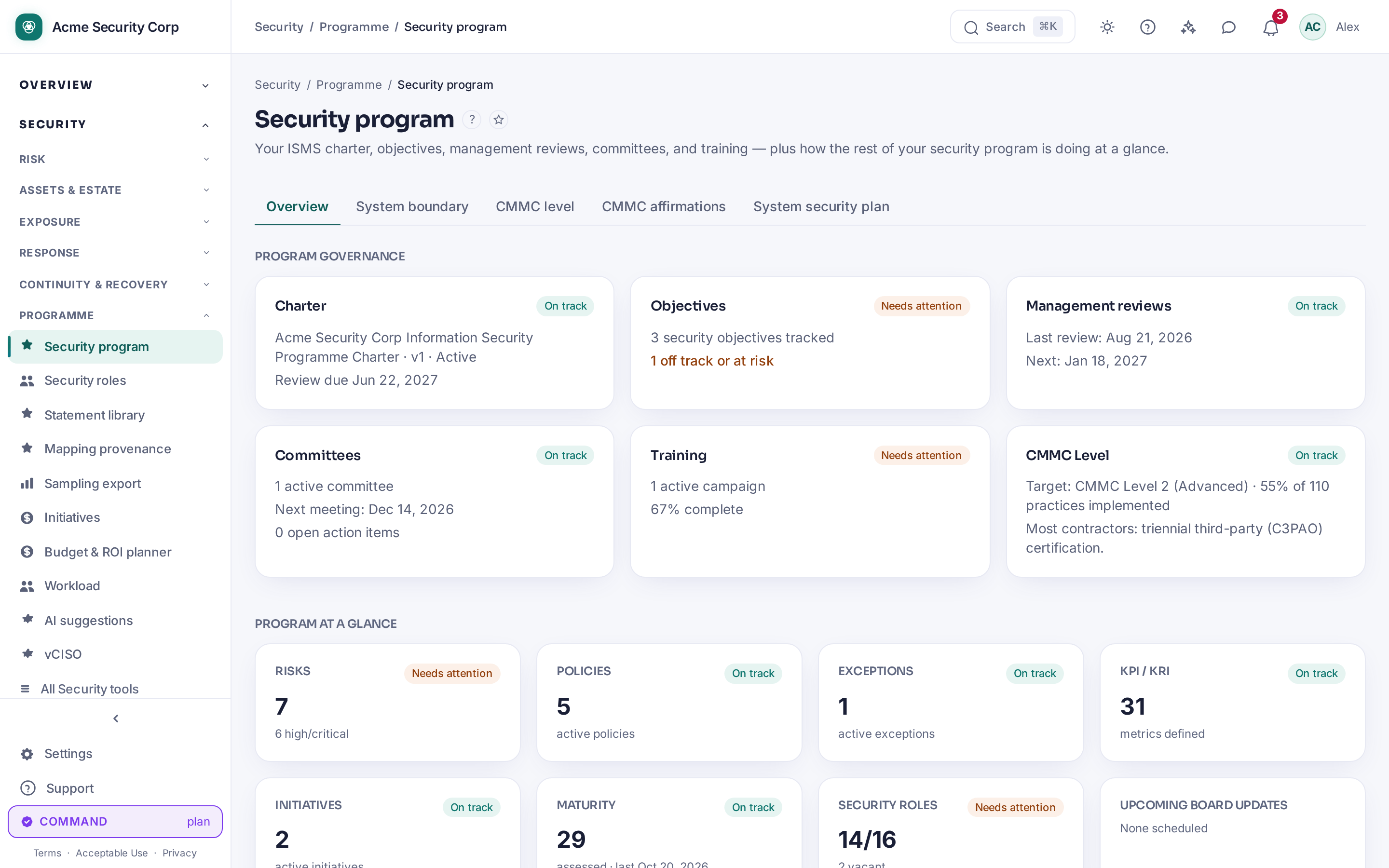
-
Set objectives. On Program → Objectives, click New objective (or Edit objective on an existing one). Objectives can be linked to other program artifacts via Add link.
-
Schedule a management review. On Program → Management Reviews, click + New review to open the "New management review" dialog, then Create review. This is the record ISO 27001 clause 9.3 asks for — CMDash's own page title is "Management Reviews."
-
Stand up a committee. On Program → Committees, click + New committee, add members with Add member, then save. Each committee's action items appear in a separate panel; anyone assigned an item can update it even without Owner/Admin.
-
Launch training. On Program → Training campaigns, click New training campaign, then Create campaign. Everyone can see and complete their own assigned training from the same page regardless of role.
-
Map the system boundary (Command+). On Program → System Boundary, click New boundary to open the "New system boundary" dialog. If your plan is below Command, this page is replaced by an upgrade prompt.
-
Pick a CMMC target level. On Program → CMMC Level, an Owner or Admin can choose Level 1, 2, or 3. Everyone else sees "Ask an OWNER or ADMIN to choose one below" instead of the picker. The card also feeds the CMMC Level tile on the Program overview, which shows the percentage of practices implemented for whichever level is currently targeted.
Common questions
Does starting a security program cost anything extra? No — Program, Charter, Objectives, Management Reviews, Committees, Training, and CMMC Level are available on every plan. Only System Boundary needs Command or higher.
Why does the overview show "Not set up" instead of a percentage or a red flag? The health badge is deliberately neutral for an org that has not started a given artifact yet. It only turns amber ("Needs attention") or red ("Critical") once something has actually been configured and needs attention — starting from zero is not treated as a problem.
Can a regular member (not Owner/Admin) do anything on these pages? Yes: they can read every governance artifact, complete their own assigned training, act on a committee action item assigned to them, and (on CMMC Level) see — but not change — the current target level.
Where does "Security Roles" fit in? It is a separate module (who at the company is accountable for security, distinct from what a CMDash login can do) reachable from Security → All Security tools and referenced as a count on the Program overview, but it is not one of Program's own six sub-pages.
Related
- In-app: Security → All Security tools → Security Program (
/program), Security → All Security tools → Security Roles (/security-roles) - CMMC, POA&M, SPRS & OSCAL — CMMC Level's assessment, scoring, and export workflow in depth
- CMMC Tracking — mapping controls to CMMC practices
- Policies & Attestations — the policy library Program's overview links to