Vendors (TPRM) & Questionnaires
What it is
This guide covers two related but separate capabilities that both involve security questionnaires, and it is worth telling them apart up front:
- Vendors (TPRM) (
/vendors, sidebar: Security → Vendors (TPRM)) is your third-party risk management register — the vendors you depend on, the outbound questionnaires you send them to assess their security, their SBOMs, and continuous monitoring of their exposure. This is where you send a questionnaire to someone else. - Answer Questionnaires (
/questionnaires, Compliance → All Compliance tools → Answer Questionnaires) and its companion Answer Library (/answer-library, Compliance → All Compliance tools → Answer Library) are the inbound side: when a customer or prospect sends CMDash's user a security questionnaire to fill out, this workspace imports it, drafts answers from your own implemented controls, evidence, and policies, and makes a human approve each answer before anything is sent back.
A vendor's own outbound questionnaire is answered by the vendor, not by anyone at your
organization, through a separate, unbranded portal at /vendor-respondent.
When to use it
Use Vendors (TPRM) when you need to assess, tier, and continuously monitor the companies you rely on — the vendor register, its exploit-intelligence queue, and its SBOM-concentration analysis all live here. Use Answer Questionnaires when someone else's security team hands you a spreadsheet of security questions to answer about your company; use Answer Library once you have answered enough of them that you want to reuse an approved answer instead of writing it again. Point an external vendor contact at the link CMDash emails them to use the vendor-respondent flow — they never log into the main app.
Before you start
Vendors (TPRM) is bundled with Enterprise, or available on Command as a paid add-on ($499/mo, 10 monitored vendors included). It is tied to that add-on rather than to a tier. A Command workspace that has NOT bought the add-on cannot open the Vendors section and sees an upgrade prompt instead. Adding, editing, or bulk-updating vendors additionally requires the Owner or Admin role; any role can view the register once the plan allows it.
Vendors beyond the included allotment (25 on Enterprise, 10 with the Command add-on) are
metered as vendor.monitored overage — see docs/pricing-entitlement-matrix.md.
Answer Questionnaires and Answer Library require the separate The Skeptic add-on, not a base plan tier. Both pages need the add-on, which is sold à la carte and is separate from the Starter/Essentials/Command/Enterprise ladder. Neither seeded demo workspace (demo@cmdash.com on Command, enterprise@cmdash.com on Enterprise) has this add-on enabled — so both pages render CMDash's upgrade wall for every plan level in this environment; there is no way to capture a populated screenshot of either page without an add-on grant.
Evidence Requests (/evidence-requests) is ungated by tier. It is a tab on Evidence, not its
own sidebar row: Compliance → Evidence, then the Requests (PBC) tab. Creating a request
needs Owner, Admin, or Assessor; fulfilling one needs Owner or Admin.
How to
Vendors (TPRM)
- Add a vendor. On Vendors, an Owner/Admin clicks + Add Vendor, opening the "New Vendor" dialog. Fill in Name (required), Website, Industry, Description, Criticality, Data Sensitivity, Status, and Point of Contact. The dialog notes "Tier is auto-computed from criticality + data sensitivity" — you do not set Tier directly.
- Send a questionnaire to that vendor. Open the vendor's page and its Questionnaires tab, then click + New Questionnaire. Pick a Template from the dropdown (each option shows its question count) and optionally a Due Date, then Create. The vendor contact then answers it through the vendor-respondent portal (below) — you never fill it in yourself.
- Track SBOM and monitoring. The same vendor page has SBOM and Monitoring tabs alongside Profile and Questionnaires.
- Check exploit exposure across all vendors. From the Vendors list, click Exploit intelligence → to see a KEV-matched (CISA Known Exploited Vulnerabilities) queue of open vulnerabilities across your vendor portfolio.
- Check shared-component risk. Click Vendor concentration → for a CycloneDX-SBOM-based view of components multiple vendors depend on; if no vendor has an SBOM on file, the page says plainly this is "an absence of data, not a finding of no concentration risk."
Answer Questionnaires (inbound, add-on required)
- Import the questionnaire you received on Answer Questionnaires: upload the customer's own
Excel (
.xlsx) or Word (.docx) file, or paste text / upload a CSV. CMDash finds the question column (a header such as "Question" and "Response" helps) and tells you which column or cell the answers will be written into. The file is kept with your saved draft (see below) so the filled copy can be downloaded later; deleting the draft deletes the file. Legacy.xls/.doc, password-protected and macro-enabled files are refused: re-save as a plain.xlsx/.docx. - CMDash drafts an answer per question, grounded in your implemented controls, approved evidence, and active policies, and shows a confidence percentage per answer.
- Review each drafted answer — edit it or confirm you have verified it — before approving; an unapproved AI answer is never sent anywhere on its own.
- Once every answer is approved, Download filled XLSX/DOCX returns the customer's own file with your answers written into it, leaving their formatting, other sheets and any cell they had already filled untouched (the count of left-alone cells is shown). CSV export remains.
- Your work is saved as a draft. The first time you draft, edit or approve, CMDash saves the questionnaire to your workspace and autosaves every change after that (the review header shows Saving… / Saved). Close the page and come back: Saved questionnaires at the top lists each draft with its progress, and Resume restores the questions, the AI drafts, your edits and your approvals, in any browser, with the customer's file ready to fill. Each answer remembers whether it is the model's text, the model's text you edited, or your own, and who approved it. Only owners and admins with the Skeptic add-on can see or change drafts; a workspace keeps at most 25, and Delete removes a draft together with the stored copy of the customer's file. If two people edit the same draft, the second save is refused with This draft changed elsewhere and a Reload link instead of overwriting the first. If a draft cannot be saved (for example the workspace is at its limit) the page says Not saved and keeps working in your browser session only.
- Promoting an approved answer into the Answer Library makes it reusable (ranked by similarity) the next time a similar question arrives. "An entry is searchable only once you publish a version — drafting or promoting never publishes automatically."
Vendor-respondent portal (for the vendor being assessed)
- The vendor contact receives an emailed invitation link to
/vendor-respondent/accept?token=.... Opening it (no prior CMDash account needed) either logs them in or, for a first-time respondent, sends them to Register with their email pre-filled — "One quick step first." - Once accepted,
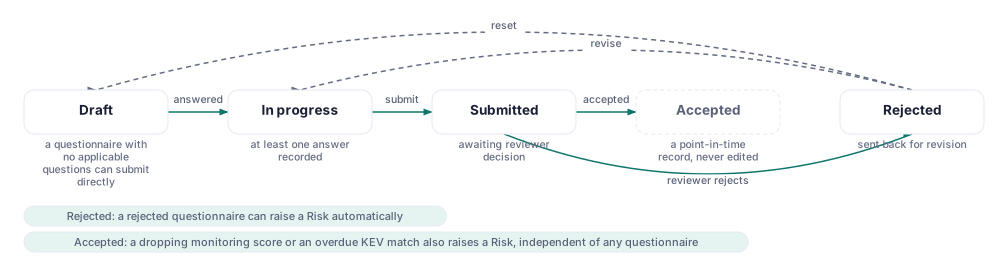
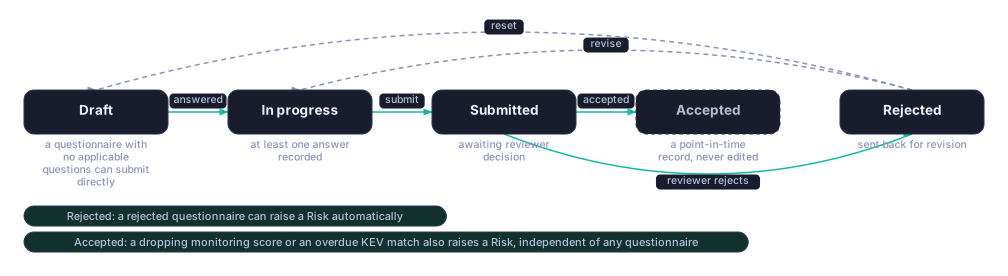
/vendor-respondentshows the requesting organization's name and a status: In progress, Submitted, Accepted, or Needs another look (if you rejected their answers and asked for changes), plus how many days remain to respond. - The respondent answers the assigned questionnaire at
/vendor-respondent/questionnaireand clicks Submit for review when done, confirming "Submit your answers?" A submitted questionnaire can no longer be edited by the respondent.
Evidence Requests
- On Evidence Requests, an Owner, Admin, or Assessor clicks New request to ask for a specific document or artifact (a "prepared-by-client," or PBC, list).
- An Owner or Admin marks each request fulfilled from the same page; comments can be added to a request while it's open.
Common questions
Why is /vendors returning "Feature not included" for my Command workspace? Third-party risk
management is Enterprise-only. Every other capability on this page (Answer Questionnaires,
Evidence Requests) is gated separately, so losing access to one does not mean you lost the
others.
Can I try Answer Questionnaires without buying anything extra? Not as shipped — it is gated on The Skeptic add-on regardless of tier, including Enterprise. Contact CMDash to add it to your plan.
Who answers a vendor's questionnaire — me or them? Them. You create and send it from the
vendor's page; they answer it through the separate, unbranded /vendor-respondent portal, which
never exposes the rest of CMDash to them.
My vendor's access expired before they finished — what happens? The vendor-respondent home page shows a countdown ("X days left to respond") and, once access is gone, an "access expired or withdrawn — ask the organization that invited you for a new one" message rather than an error.
Related
- In-app: Security → Vendors (TPRM) (
/vendors), Compliance → All Compliance tools → Answer Questionnaires (/questionnaires), Compliance → All Compliance tools → Answer Library (/answer-library), Compliance → Evidence → Requests (PBC) tab (/evidence-requests) - Evidence Collection — how evidence gets mapped to controls generally
- Security Programme — where governance sits alongside vendor risk